Single Ghost
One person works through one journey: sign-up, a booking, a form. The quickest way to check that a path works at all.
Product
Ghost Company describes who uses your app, what each of them may do and what they are trying to achieve. Then it runs them together in a browser, records what happened and tells you whether a fix holds.
01Ghost users
Who the ghost is, what it is allowed to do and what it is trying to achieve are defined independently. Appearance never grants capability: the same ghost can be an anonymous visitor in one run and an administrator in the next.
Persona
Identity and temperament
A name, a bio, traits, pace and curiosity. Carries no permissions.
Access profile
Audience and permissions
What the ghost is granted, and what it will attempt anyway.
Objectives
What it is trying to do
Goals inside the scenario, such as "submit a document and confirm it was approved".
Ghost user
02Test modes
The same engine runs all three modes. Pick the one that matches the question you are asking.
One person works through one journey: sign-up, a booking, a form. The quickest way to check that a path works at all.
Several independent people use the app at once. Useful for shared state, limited capacity and anything that should not collide.
A fictional organization with units, positions and reporting lines. For approvals, escalations and hand-offs between teams.
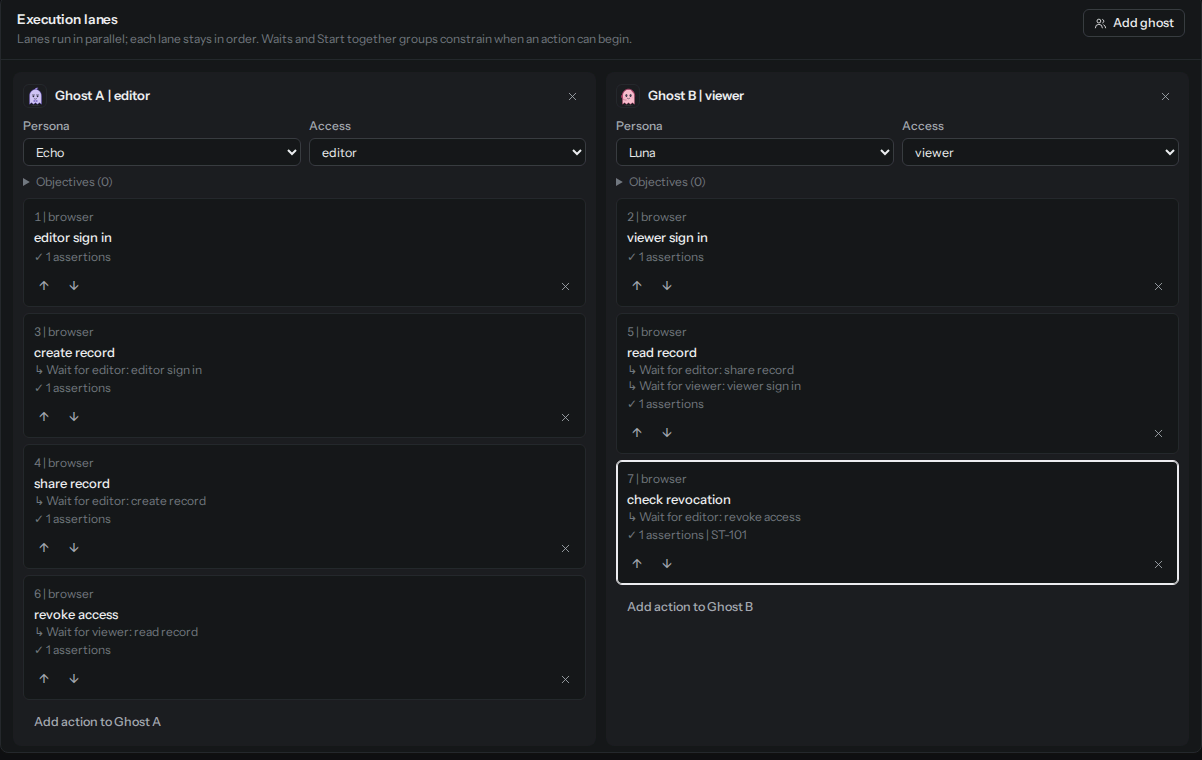
In a parallel scenario each ghost acts in its own lane. An action can wait for another ghost's action to finish, and several actions can start together at a named point with a timeout. Validation rejects cycles and one-sided groups, so no ghost waits forever. Waiting is shown as coordination, never as a failure.
03Scenario Studio
A scenario describes the application context, the ghosts, the workflow and a timeline of actions with checks. Studio lets you build one lane per ghost, add assertions, and see validation problems next to the card that caused them.
04AI-assisted drafting
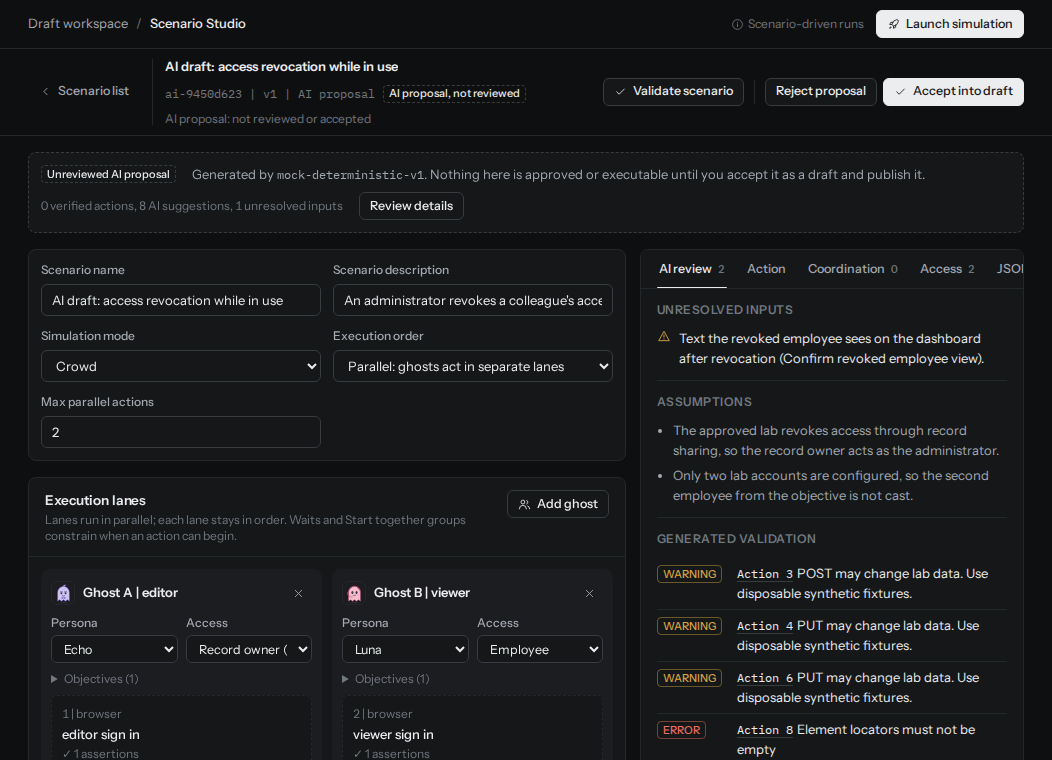
An administrator can describe a testing goal in plain language and receive a proposed scenario. The proposal is untrusted until a person reviews it and accepts it as a draft. Publishing and running stay separate steps. The ghosts themselves are not autonomous agents: runs follow the approved scenario and its browser assertions.
The AI can
The AI cannot
05Browser execution
Browser scenarios run with Playwright and Chromium inside a fresh sandbox per run, against operator-approved synthetic labs. Pass or fail comes from assertions on what the browser actually saw.
Each run gets its own gVisor-isolated browser that is destroyed afterwards.
All traffic leaves through a proxy that allows only the run's authorized lab.
Labs are reset to a known synthetic state, and readiness is checked before any action.
Running ghosts against customer applications is disabled until independent security review and release approval are complete. Built-in demo runs in Mission control use a scripted runner and are labelled that way in the product.
06Findings and evidence
07Regression checks
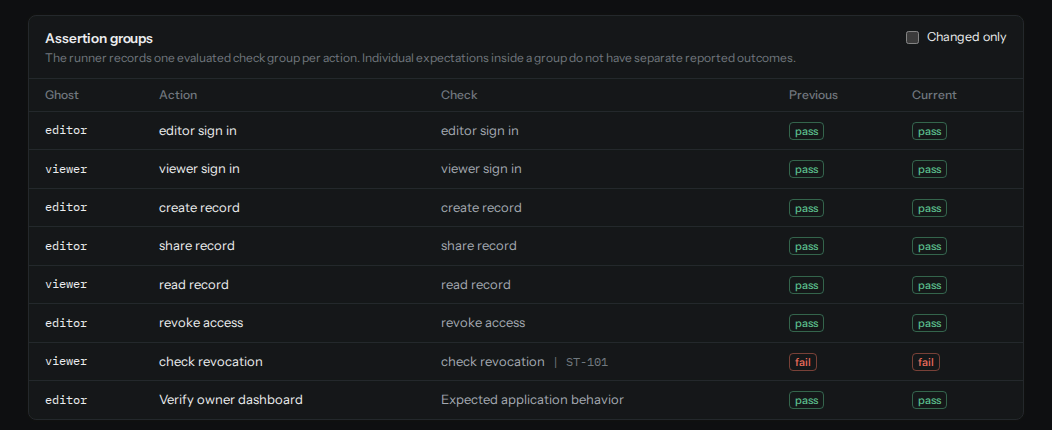
A saved check repeats one published scenario version in a lab. Choose All assertions pass, or approve a complete run as a baseline and choose No new failures since a trusted run.
Comparisons only conclude when conditions match: the same scenario version, lab configuration, initial fixture and execution options. Otherwise the result is inconclusive, and it says so. A missing finding is not treated as a fix unless the same checks ran and passed.
08CLI and CI
Generate a token scoped to one saved check. It expires after 30 days and can be rotated or revoked. The CLI prints one versioned JSON object and an optional Markdown summary without credentials, URLs or response bodies.
A reusable GitHub Actions workflow runs the check on a dedicated runner in your isolated environment, and can require the lab to report the exact commit under test.
# Run a saved regression check
npm run --silent ghost -- check \
  --org "$GHOST_ORG_ID" \
  --check "$GHOST_CHECK_ID" \
  --revision "$GITHUB_SHA" \
  --markdown ghost-regression.md \
> ghost-regression.json| Exit | Meaning |
|---|---|
| 0 | Completed and met the saved pass policy |
| 1 | Completed and failed the saved policy |
| 2 | Infrastructure, authorization, timeout or inconclusive evidence |
| 64 | Invalid CLI configuration |
| 130 | Interrupted locally |
09Workspaces and accounts
Early access starts with teams whose apps fit the current lab boundary. Tell us what you are building.